
Introduction
In today’s digital world, passwords protect almost every part of our online life. From email and social media to banking and work tools, a simple password often stands between safety and serious trouble. That is why understanding password security best practices is no longer optional. It is a basic digital skill for everyone.
Many people still use weak passwords because they seem easy to remember. However, hackers also find them easy to break. Cybercriminals use automated tools, data leaks, and clever tricks to guess passwords in seconds. As a result, one weak password can lead to identity theft, financial loss, or data misuse.
The good news is that strong password habits are not difficult to learn. With the right approach, anyone can improve their security without feeling overwhelmed. Small changes, such as creating longer passwords or using a manager, can make a big difference.
This guide explains password security best practices in simple English. It is designed for beginners and intermediate users who want clear, practical advice. You will learn what password security really means, why it matters, and how to apply step-by-step methods that work in real life. By the end, you will feel confident about protecting your accounts and personal information online.
What Is Password Security Best Practices?
Password security best practices are a set of proven methods used to create, manage, and protect passwords safely. These practices reduce the risk of unauthorized access to online accounts and systems.
Instead of using short or predictable passwords, best practices focus on strength, uniqueness, and proper storage. They also include habits like regular updates and using extra protection layers when available.
In simple terms, password security best practices help you stay one step ahead of hackers. They turn passwords from weak locks into strong digital barriers.
Why Is Password Security Best Practices Important?
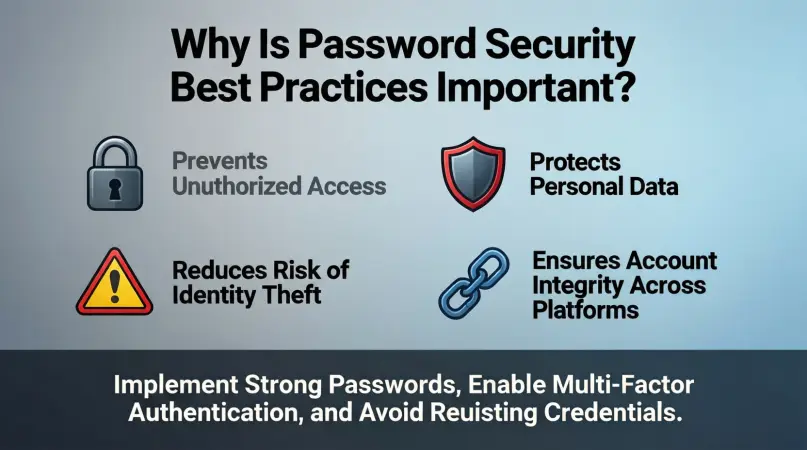
Passwords are often the first and only defense against cyber threats. If a password is compromised, attackers may gain full access to an account.
Here is why password security best practices matter:
First, data breaches are common. Millions of passwords are leaked every year, and reused passwords make the damage worse.
Second, weak passwords can expose personal and financial information. This may lead to fraud, identity theft, or account takeovers.
Finally, strong password habits protect both personal users and businesses. They reduce stress, save money, and prevent long-term damage.
Following password security best practices is a simple way to stay safe in an increasingly connected world.
Detailed Step-by-Step Guide
Step 1: Create Strong and Long Passwords
A strong password is long, unique, and hard to guess. Length matters more than complexity alone.
Follow these rules:
- Use at least 12 to 16 characters
- Combine letters, numbers, and symbols
- Avoid common words and names
For example, a phrase with random words is stronger than a short complex string.
Step 2: Avoid Reusing Passwords
Using the same password on multiple sites is risky. If one site is breached, all related accounts are exposed.
Instead:
- Use a different password for each account
- Prioritize unique passwords for email and banking
This is a core part of password security best practices.
Step 3: Use a Password Manager
Password managers store and generate strong passwords for you. They remove the need to remember everything.
Benefits include:
- Secure encrypted storage
- Auto-fill features
- Random password generation
They make following password security best practices much easier.
Step 4: Enable Two-Factor Authentication
Two-factor authentication adds an extra step after entering a password.
Common methods include:
- One-time codes
- Authentication apps
- Hardware keys
Even if a password is stolen, this layer can block access.
Step 5: Update Passwords When Needed
Changing passwords regularly is useful after a breach or suspicious activity.
Best times to update include:
- After a data leak
- When sharing devices
- If a password feels exposed
Avoid unnecessary frequent changes unless required.
Step 6: Watch Out for Phishing Attacks
Hackers often trick users into giving away passwords.
Stay alert by:
- Checking sender details
- Avoiding unknown links
- Never sharing passwords by email
Awareness supports password security best practices.
Benefits of Password Security Best Practices
- Stronger protection against hacking
- Reduced risk of identity theft
- Better control over online accounts
- Peace of mind and confidence
- Improved personal and business security
Disadvantages / Risks
- Managing many passwords can feel overwhelming
- Password managers require trust and setup
- Extra security steps may take more time
However, these risks are minor compared to the benefits.
Common Mistakes to Avoid
Many users weaken security without realizing it.
Avoid these mistakes:
- Using short or simple passwords
- Reusing passwords across sites
- Writing passwords on paper
- Ignoring security alerts
- Falling for phishing messages
Correcting these habits strengthens overall safety.
FAQs
What is the safest type of password?
The safest password is long, unique, and random. Passphrases with unrelated words work very well.
How often should I change my passwords?
Change passwords after a breach or if you suspect misuse. Routine changes are less important than strength.
Are password managers really safe?
Reputable password managers use strong encryption and are safer than manual storage.
Can strong passwords stop all hackers?
No security is perfect, but strong passwords greatly reduce risk when combined with other measures.
Is two-factor authentication necessary?
Yes, it adds a strong extra layer and is highly recommended for important accounts.
What should I do if my password is leaked?
Change it immediately, update related accounts, and enable extra security features.
Expert Tips & Bonus Points
Experts recommend focusing on habits rather than memory. Use tools that support password security best practices automatically.
Additional tips include:
- Secure your email account first
- Use device-level security
- Review account activity regularly
- Educate family members
Small actions, when consistent, create strong protection.
Conclusion
Password security best practices are essential for anyone who uses the internet regularly. Passwords protect our communication, finances, and personal data, making them a critical part of digital life.
Many security problems happen not because of advanced hacking, but because of weak or reused passwords. Fortunately, this means most risks are preventable. By creating strong passwords, avoiding reuse, and using tools like managers and two-factor authentication, users can greatly improve their safety.