
Introduction
Online privacy protection has become one of the most important topics in today’s digital world. Every day, people share personal information online without fully understanding where it goes or how it is used. From social media platforms to online shopping websites, your data is constantly being collected, stored, and sometimes shared with third parties. This makes online privacy protection a basic life skill, not just a technical topic for experts.
As more services move online, beginners and intermediate users often feel confused or overwhelmed. They hear about data breaches, identity theft, and tracking, but they are not sure what steps to take. The good news is that online privacy protection does not have to be complicated. With the right knowledge and habits, anyone can improve their digital safety.
This guide is written in simple English to help you understand the basics clearly. You will learn what online privacy protection means, why it matters, and how you can apply it step by step in daily life. Practical examples, clear explanations, and realistic advice are included throughout the article.
By the end of this guide, you will feel more confident about controlling your personal information. Whether you are a student, professional, or casual internet user, these tips will help you build safer online habits and protect your digital identity for the long term.
What is Online Privacy Protection?
Online privacy protection refers to the methods and practices used to keep your personal information safe while using the internet. This includes protecting your name, email address, passwords, financial data, browsing history, and online behavior from unauthorized access or misuse.
When you visit websites or use apps, data is often collected automatically. Some of this data is needed for services to work properly. However, other data may be used for advertising, tracking, or analytics. Online privacy protection helps you control how much information you share and who can access it.
In simple terms, it is about setting boundaries online. Just as you lock your home to stay safe, you need digital locks to protect your online presence. These locks include privacy settings, secure passwords, and safe browsing habits.
Online privacy protection is not about hiding everything. Instead, it focuses on sharing information wisely and reducing unnecessary risks. With the right approach, you can enjoy online services while keeping your personal data secure.
Why is Online Privacy Protection Important?
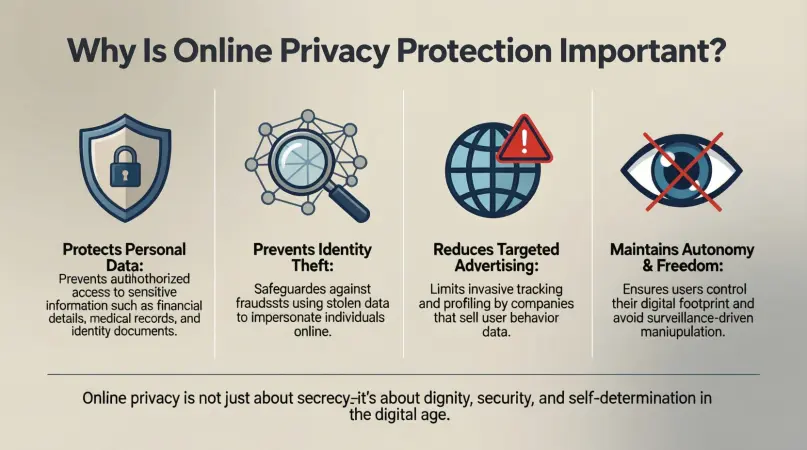
Online privacy protection is important because personal data has real value. Cybercriminals, advertisers, and even unknown third parties can misuse your information if it is not protected.
First, poor privacy can lead to identity theft. When attackers access personal details, they can pretend to be you online. This may result in financial loss or damage to your reputation.
Second, privacy affects personal freedom. When your online activities are tracked, your choices can be influenced without your knowledge. This can change what you see, buy, or believe.
Third, data breaches are becoming more common. Even trusted platforms can be hacked. Online privacy protection reduces the impact of such incidents by limiting the data exposed.
Finally, protecting privacy builds trust. When you understand how to manage your data, you feel more confident using online services. This confidence allows you to take advantage of digital tools without constant fear or stress.
Detailed Step-by-Step Guide
Step 1: Understand What Data You Share
The first step in online privacy protection is awareness. Pay attention to what information you provide online.
Check signup forms carefully. Many services ask for more data than necessary. Only share what is required to use the service.
Read permission requests on apps. If a simple app asks for access to contacts or location, question why it needs that data.
Being mindful of shared information reduces unnecessary exposure.
Step 2: Use Strong and Unique Passwords
Passwords are the first line of defense. Weak passwords make it easy for attackers to access accounts.
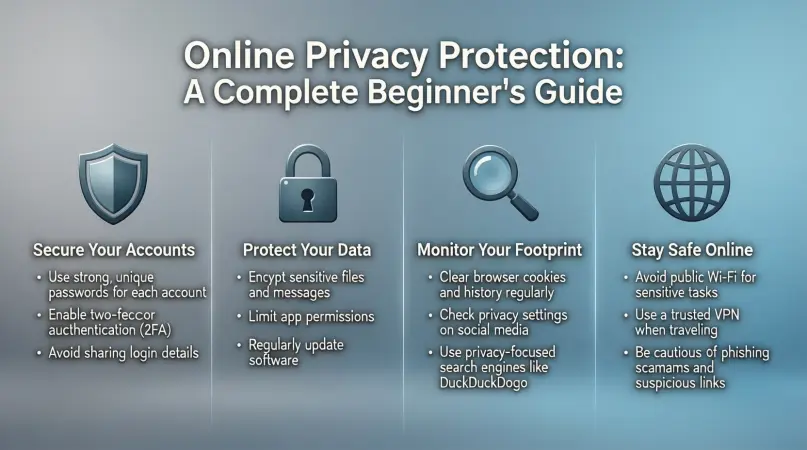
Create long passwords using letters, numbers, and symbols. Avoid using personal details like birthdays or names.
Use different passwords for different accounts. This way, if one account is compromised, others remain safe.
Password managers can help store and generate secure passwords easily.
Step 3: Enable Two-Factor Authentication
Two-factor authentication adds an extra security layer. It requires a second step to verify your identity.
This second step may include a code sent to your phone or an authentication app. Even if someone steals your password, they cannot access your account without this code.
Enable two-factor authentication on important accounts like email, banking, and social media.
Step 4: Adjust Privacy Settings
Most platforms offer privacy settings that control who can see your information.
Review these settings regularly. Limit profile visibility to trusted people only.
Turn off public sharing options when possible. This reduces the chances of strangers accessing your data.
Privacy settings are powerful tools for online privacy protection when used correctly.
Step 5: Browse Securely
Use secure connections when browsing. Avoid entering personal data on websites without proper security indicators.
Be cautious with public Wi-Fi networks. These networks are often unsecured and can be monitored by others.
If possible, avoid sensitive activities like online banking on public networks.
Safe browsing habits protect your data from interception.
Step 6: Manage Cookies and Tracking
Cookies are small files that track your online behavior. Some are helpful, but others invade privacy.
Review cookie settings in your browser. Block unnecessary tracking cookies.
Clear cookies and browsing history regularly. This limits long-term tracking.
Managing cookies is an important part of online privacy protection.
Step 7: Be Careful with Emails and Messages
Phishing attacks are common and dangerous. Attackers use fake messages to trick users into sharing information.
Do not click on unknown links or download attachments from suspicious emails.
Verify the sender before responding. When in doubt, ignore or delete the message.
Awareness helps prevent many online privacy issues.
Step 8: Keep Software Updated
Software updates often include security fixes. Ignoring updates leaves systems vulnerable.
Enable automatic updates where possible. This ensures you always have the latest protection.
Regular updates reduce the risk of known security weaknesses being exploited.
Benefits of Online Privacy Protection
- Protects personal and financial information
- Reduces risk of identity theft
- Increases control over personal data
- Builds confidence in online activities
- Limits unwanted tracking and advertising
- Improves overall digital security
Disadvantages / Risks
- Requires time and effort to manage settings
- Some services may limit features with strict privacy controls
- Learning curve for beginners
- False sense of security if practices are inconsistent
- Over-reliance on tools without understanding basics
Common Mistakes to Avoid
Many people make simple mistakes that weaken online privacy protection. One common mistake is reusing passwords across multiple platforms. This creates a chain risk.
Another mistake is ignoring privacy policies. While long, these policies explain how data is used. Skimming key points can help.
Sharing too much on social media is also risky. Public posts can be seen and saved by anyone.
Finally, trusting unknown apps or websites without research can expose data. Always verify before sharing information.
FAQs
What is the biggest threat to online privacy?
The biggest threat is lack of awareness. When users do not understand how data is collected, they unknowingly expose themselves to risks.
Can beginners really protect their online privacy?
Yes, beginners can take simple steps like strong passwords and privacy settings to improve protection significantly.
Is online privacy protection expensive?
Most basic privacy measures are free. Good habits matter more than paid tools.
How often should privacy settings be reviewed?
Review settings every few months or after platform updates to ensure continued protection.
Does online privacy protection slow down internet use?
Generally, no. Some tools may slightly affect speed, but the difference is usually small.
Is complete online privacy possible?
Complete privacy is difficult, but strong online privacy protection greatly reduces risks.
Expert Tips & Bonus Points
Use separate email addresses for different purposes. This limits exposure if one account is compromised.
Regularly review app permissions and remove unused apps. Less data shared means lower risk.
Educate family members about privacy basics. A secure environment depends on everyone’s habits.
Stay informed about common online threats. Awareness evolves with technology.
Conclusion
Online privacy protection is no longer optional in the modern digital world. As internet usage continues to grow, so do the risks connected to personal data exposure. Understanding how your information is collected and used gives you the power to make smarter decisions online.
This guide showed that online privacy protection is not about fear or complexity. It is about awareness, consistency, and simple habits. From using strong passwords to adjusting privacy settings, each small action adds a layer of safety. Over time, these layers create strong digital protection.