
Introduction
Cyber security for beginners is one of the most important topics in today’s digital world. Almost everyone uses the internet for work, learning, shopping, banking, and communication. Because of this, online threats are growing every day. Hackers, scammers, and cybercriminals are always looking for easy targets, especially people who are new to digital security. This is why learning cyber security for beginners is no longer optional. It is a basic life skill.
In simple words, cyber security helps protect your data, devices, and online identity. It keeps your personal information safe from being stolen or misused. Many beginners think cyber security is only for experts or large companies. However, this is not true. Anyone who uses a smartphone, computer, or internet connection needs basic cyber security knowledge.
Cyber security for beginners focuses on simple habits, clear understanding, and practical steps. You do not need advanced technical skills to get started. By learning the basics, you can avoid common mistakes and reduce most online risks. Even small actions, such as using strong passwords or updating software, can make a big difference.
This guide is written in simple English to help beginners and intermediate readers. It explains key concepts, step-by-step actions, benefits, risks, and common mistakes. By the end of this article, you will feel more confident and prepared to stay safe online in your daily digital life.
What is Cyber Security for Beginners?
Cyber security for beginners means learning how to protect digital devices, networks, and data from online threats. It focuses on simple rules and easy tools that anyone can use. The main goal is to keep information safe and prevent unauthorized access.
Cyber security includes protecting computers, mobile phones, tablets, and online accounts. It also covers safe internet behavior, such as avoiding suspicious links or downloads. For beginners, cyber security starts with awareness. Knowing what threats exist is the first step toward protection.
Common cyber threats include viruses, malware, phishing emails, and identity theft. These threats often target beginners because they may not recognize warning signs. Cyber security for beginners teaches how to spot these dangers early.
It also involves using basic security tools. Examples include antivirus software, firewalls, and password managers. Beginners learn how these tools work and why they are important. Cyber security is not about fear. It is about being prepared and informed.
In simple terms, cyber security for beginners is about staying safe online by using smart habits, basic tools, and common sense.
Why is Cyber Security for Beginners Important?
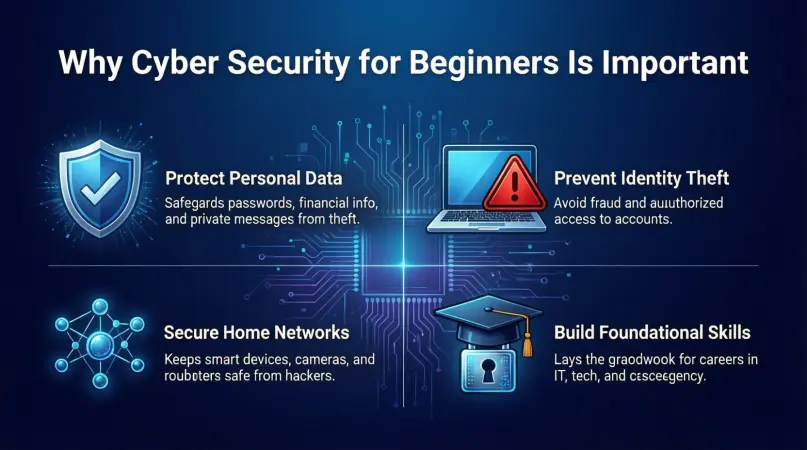
Cyber security for beginners is important because online risks affect everyone. Personal data is valuable, and cybercriminals know this. Even a single mistake can lead to serious problems.
First, cyber security protects personal information. This includes names, passwords, bank details, and private messages. Without protection, this data can be stolen and misused.
Second, cyber security helps prevent financial loss. Online scams and fraud can empty bank accounts or cause unauthorized purchases. Beginners are often targeted because they may trust fake messages.
Third, cyber security protects devices. Malware can slow down systems, damage files, or lock devices completely. Fixing these problems can be expensive and stressful.
Fourth, cyber security builds confidence. When beginners understand basic security steps, they feel more comfortable using technology. This confidence allows safer learning, working, and communication online.
Finally, cyber security for beginners supports long-term digital safety. Good habits learned early can protect users for years. It reduces risks and creates a safer online environment for everyone.
Detailed Step-by-Step Guide
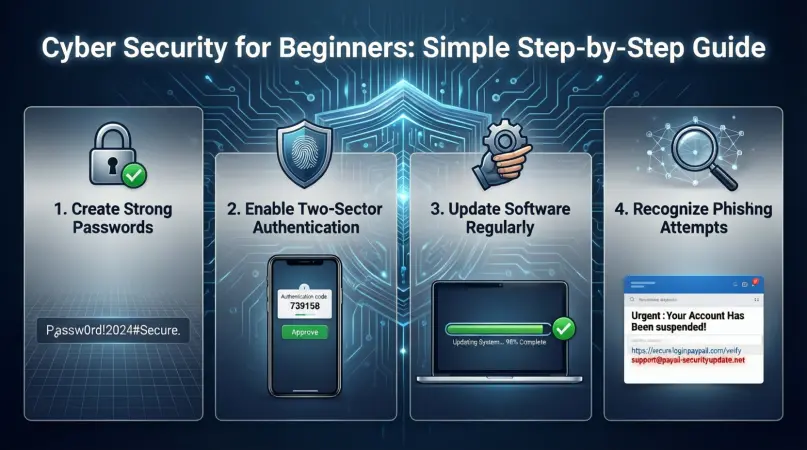
Step 1: Understand Common Cyber Threats
The first step in cyber security for beginners is understanding common threats. Knowledge helps you recognize danger early.
Common threats include:
- Phishing emails that pretend to be real messages
- Malware hidden in downloads or attachments
- Weak passwords that are easy to guess
- Fake websites designed to steal information
By knowing these threats, beginners can stay alert and cautious online.
Step 2: Create Strong and Unique Passwords
Passwords are the first line of defense. Cyber security for beginners strongly focuses on password safety.
A strong password should:
- Be at least twelve characters long
- Include letters, numbers, and symbols
- Avoid personal details like names or dates
Using different passwords for each account is also important. Password managers can help store them safely.
Step 3: Enable Two-Factor Authentication
Two-factor authentication adds an extra layer of security. It requires a second step to log in.
This second step may include:
- A code sent to your phone
- A fingerprint or face scan
- A security app confirmation
For beginners, this step greatly reduces the risk of account hacking.
Step 4: Keep Software and Devices Updated
Updates often include security fixes. Ignoring them leaves devices vulnerable.
Cyber security for beginners includes:
- Updating operating systems regularly
- Installing software updates promptly
- Removing unused or outdated programs
Automatic updates can make this step easier and more reliable.
Step 5: Use Antivirus and Firewall Protection
Basic security tools are essential. Antivirus software scans and removes threats.
Firewalls help block unauthorized access. Many devices already include built-in firewalls. Beginners should make sure these tools are active and updated.
Step 6: Practice Safe Browsing Habits
Safe browsing is a key part of cyber security for beginners. Simple habits reduce many risks.
Good habits include:
- Avoiding unknown links and pop-ups
- Downloading files only from trusted sources
- Checking website addresses carefully
These actions protect users from fake websites and harmful downloads.
Step 7: Secure Home and Public Networks
Network security matters, even at home. Beginners should protect Wi-Fi connections.
Important steps include:
- Using strong Wi-Fi passwords
- Changing default router settings
- Avoiding public Wi-Fi for sensitive tasks
These steps reduce the risk of unauthorized access.
Benefits of Cyber Security for Beginners
- Protects personal and sensitive information
- Reduces the risk of online scams and fraud
- Keeps devices running smoothly and safely
- Builds confidence in using digital tools
- Saves money by preventing data loss
- Encourages responsible internet behavior
- Supports long-term digital safety
Disadvantages / Risks
- Requires time to learn basic concepts
- Security tools may cost money
- Overconfidence can lead to mistakes
- False security alerts may cause confusion
- Poor setup can reduce effectiveness
Common Mistakes to Avoid
Many beginners make simple mistakes that increase risk. Avoiding these errors improves cyber security.
One common mistake is using weak passwords. Simple passwords are easy to guess and dangerous.
Another mistake is trusting unknown emails or messages. Cybercriminals often use fake urgency to trick users.
Ignoring updates is also risky. Outdated software is a common entry point for attacks.
Using public Wi-Fi without protection is another problem. Beginners should avoid sensitive activities on open networks.
Finally, assuming cyber security is not necessary is a major mistake. Everyone needs basic protection.
FAQs
What is cyber security for beginners in simple words?
Cyber security for beginners means learning simple ways to stay safe online. It includes protecting devices, accounts, and personal information from online threats using basic tools and smart habits.
Do beginners need technical skills for cyber security?
No, beginners do not need advanced technical skills. Cyber security for beginners focuses on awareness, basic tools, and simple actions that anyone can learn and apply.
Is antivirus software enough for beginners?
Antivirus software is helpful, but it is not enough alone. Beginners should also use strong passwords, updates, and safe browsing habits for better protection.
How often should passwords be changed?
Passwords should be changed regularly, especially if there is a security breach. Cyber security for beginners recommends updating passwords every few months.
Can mobile phones be hacked easily?
Yes, mobile phones can be hacked if not protected. Beginners should use screen locks, updates, and trusted apps to reduce risk.
Is cyber security expensive for beginners?
Cyber security does not have to be expensive. Many basic tools are free, and good habits cost nothing. Learning is the most valuable investment.
Expert Tips & Bonus Points
Start small and build habits slowly. Cyber security for beginners is more effective when practiced daily.
Always question unexpected messages or offers. If something feels wrong, it probably is.
Back up important data regularly. This protects files if devices are damaged or attacked.
Teach family members basic cyber security. Shared knowledge improves overall safety.
Stay informed about new threats. Awareness helps beginners adapt and stay protected.
Conclusion
Cyber security for beginners is not difficult, but it is essential. In a world where digital activity is part of everyday life, basic protection is necessary for everyone. Learning simple steps can prevent serious problems and reduce stress. Cyber security is not about complex technology. It is about awareness, smart habits, and consistent actions.
By understanding common threats, using strong passwords, enabling extra security, and keeping devices updated, beginners can greatly reduce risks. These actions protect personal data, finances, and digital identities. Over time, these habits become natural and easy to follow.